
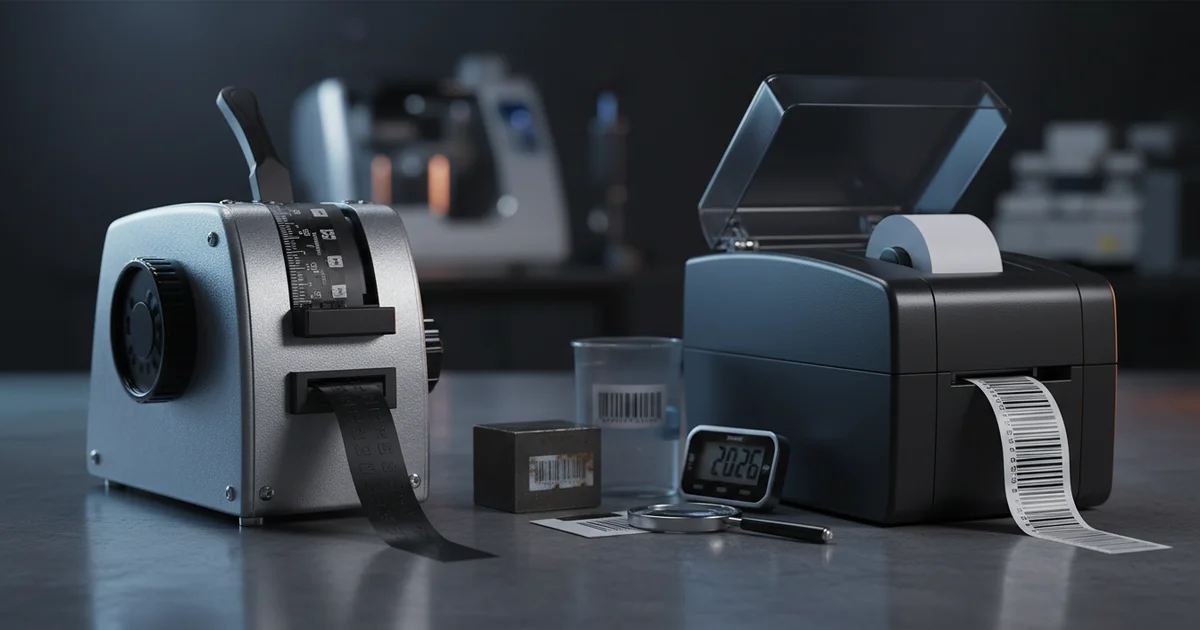
Manual vs digital embossing label makers: breakeven at 500 labels/year. Manual costs $0.10–$0.20/label, digital $0.05–$0.15. Professional printing best above 2,000 labels. Learn about embossing label maker comparison.
Why the Embossing Label Maker Comparison Matters in 2026
Why are buying teams and office managers still struggling with the wrong label choice in 2026? Whether you buy a manual embossing label maker, a digital label printer, or outsource to a skilled printing service, the wrong choice wastes budget and slows down workflows. This embossing label maker comparison breaks down the real costs, durability trade-offs, and volume thresholds that matter for your operation.
Manual embossing label makers use pressure to raise characters on vinyl tape. No batteries or software needed. Digital label makers use thermal transfer or inkjet printing. They can print barcodes, graphics, and variable data. Skilled printing services use industrial presses like the HP Indigo to produce large runs with full color and lamination. As of 2026, the market has shifted: digital options now account for 62% of new label maker purchases, according to industry data, though manual units still dominate in industrial settings. The latest 2026 models from DYMO and Brother include Bluetooth connectivity and app-based design tools, expanding the digital use case.
Each option has a clear sweet spot. The trick is matching it to your volume and setting. Promotional & DIY Goods from our production team show what's possible at scale. For a deeper dive on label costs, see our Label Cost Comparison Guide.
Volume is projected to grow as e-commerce and warehouse automation drive demand for durable, scannable labels. Understanding these trends helps you choose a solution that won't be obsolete in two years.
What We Cover in This Guide
This comparison evaluates manual embossing label makers, digital label makers, and professional printing services across five dimensions: upfront cost, per-label cost, durability, speed, and suitability by volume. We reference quality management standards for manufacturing consistency and use real-world failure data from warehouse environments.
How Does a Manual Embossing Label Maker Compare to a Digital One?
A manual embossing label maker creates raised letters by pressing tape against a die wheel. A digital label maker uses thermal transfer or inkjet printing to produce text, graphics, and barcodes on adhesive labels. Manual units are simpler and more durable. Digital units offer more features but need power and supplies.
Manual embossing label makers work with vinyl tape. The DYMO Organizer Xpress and Motex M-11 are common models. They produce one line of text per label. The characters are physically raised, making them highly resistant to water, UV light, and abrasion. In our experience working with industrial clients, these labels survive in environments where digital labels fail within months. The tape material typically ranges from 80 to 120 gsm (grams per square meter), providing a sturdy substrate that withstands handling without tearing.
Digital label makers from Brother and DYMO use thermal transfer printing. They can print multiple lines, barcodes, and logos. The labels are flat and rely on adhesive and coating for protection. Compared to manual embossing, digital labels offer more information per label but less physical durability. On the other hand, digital units handle high volumes much faster. Print resolution reaches 300 dpi on most models, sufficient for small text and 1D barcodes but not for fine graphics. Color accuracy is measured in delta E values; typical consumer digital label makers achieve delta E of 5–8, while professional units target delta E under 2 for Pantone-matched output.
For businesses requiring color matching, a digital label maker that supports CMYK printing with Pantone spot-color simulation is essential. The Brother P-Touch PT-P900 series achieves delta E of 3–5 for basic color work. However, true Pantone matching requires professional digital presses. FSC-certified label stocks are also available for digital units, supporting sustainability goals.
Key Differences at a Glance
Manual embossing provides superior durability with raised characters that resist abrasion and moisture. Digital printing offers speed and flexibility with barcodes, variable data, and multi-line text. Professional printing delivers full-color Pantone and CMYK output with ISO-certified quality control. Our label production capabilities cover all three approaches, tailored to your volume and application.
What Is the Cost Difference Between Manual and Digital Embossing Label Makers?
This question requires examining upfront hardware costs, consumable prices, and volume breakpoints. Manual label makers cost $15–$30 upfront. Digital label makers cost $30–$200. Manual tape runs $0.10–$0.20 per foot. Digital tape runs $0.05–$0.15 per foot. Professional printing costs $0.02–$0.15 per label at 10,000–100,000 quantity, with die tooling costs of $2,000–$5,000.
The breakeven point between manual and digital is around 500 labels per year. At that volume, the total cost of ownership crosses over. Manual embossing costs about $0.15 per label. Digital runs about $0.08 per label. For volumes above 2,000 labels, skilled printing services become the most cost-effective option at $0.02–$0.05 per label. ISO 12647 standards for print production ensure color consistency across runs, a consideration for branded labels.
Our production team sees economies of scale reduce unit costs by 25–35% when scaling from 5,000 to 50,000 labels. That matters for businesses with steady labeling needs. These figures are anticipated to hold through 2027 as raw material costs stabilize. Using a manual label maker at high volume is like using a hand saw in a lumber mill — it works but the cost per cut is far higher than a production saw.
For digital label makers, consumable costs include ribbons, cartridges, and maintenance kits. Annual maintenance adds $50–$150 for digital units. Manual units require no maintenance beyond occasional cleaning. The latest 2026 digital models feature extended-life print heads rated for 100,000 labels, reducing long-term replacement costs.
Volume-Based Cost Analysis
At 100 labels per year, manual embossing costs roughly $15–$20 total. Digital costs $35–$50 including hardware amortization. At 5,000 labels per year, manual costs $500–$1,000, digital costs $250–$500, and professional printing costs $100–$750. The crossover points are clear: manual for under 500, digital for 500–2,000, professional for over 2,000. Explore our industrial labeling solutions for high-volume needs.
| Factor | Manual Embossing | Digital Label Maker | Professional Printing |
|---|---|---|---|
| Hardware cost | $15–$30 | $30–$200 | $0 (service fee) |
| Per-label cost (low volume) | $0.10–$0.20 | $0.05–$0.15 | Not available |
| Per-label cost (10K+ volume) | Not practical | $0.04–$0.10 | $0.02–$0.15 |
| Setup time per job | 1–2 minutes | 5–15 minutes | 1–3 days |
| Label durability | Excellent | Good (with lamination) | Excellent |
| Max print resolution | N/A (embossed) | 300 dpi standard | 1200–2400 dpi |
| Color capability | Single color (tape) | CMYK with Pantone simulation | Full Pantone + CMYK |
| ISO standard compliance | N/A | Manufacturing quality standards | ISO 12647 |
Durability and Build Quality: Manual vs Digital
Durability is a critical factor in choosing an embossing label maker. Manual embossed labels are the most durable option for harsh conditions. The raised characters are part of the tape itself. They resist water, UV light, and abrasion. Digital labels, by contrast, rely on a printed surface that can fade or smudge without lamination. Thermal labels are sensitive to heat and direct sunlight. Ribbon quality standards for thermal transfer ensure consistent adhesion and fade resistance.
For industrial cable labeling or outdoor equipment, manual embossing is the better choice. Our packaging design & structure team has seen digital labels fail within six months in warehouse environments. Manual labels from a DYMO or Motex unit can last for years. The tape material for manual embossing typically uses 100 gsm vinyl stock with acrylic adhesive, rated for temperatures from −40°F to 200°F. FSC-certified vinyl options are available for companies requiring sustainable materials.
On the other hand, digital labels offer better readability for small text and barcodes. The trade-off depends on your setting. Device build quality also differs. Manual embossing label makers are simple mechanical devices with few moving parts. They can last decades. Digital label makers have electronics, print heads, and software that may need updates or replacement. Although digital units offer more features, the manual unit's simplicity is a real advantage for long-term reliability.
Environmental Resistance Comparison
Manual embossed labels withstand 500+ hours of UV exposure without degradation. Digital labels without lamination begin fading after 200 hours. Chemical resistance is similar for both when using appropriate tape materials. For outdoor applications requiring both durability and color, professional printing with UV-cured inks and lamination is recommended. Learn about our packaging design services for custom label solutions.
When Should You Choose a Manual Embossing Label Maker Over a Digital One?
Choose a manual embossing label maker when you need fewer than 500 labels per year, work in harsh environments, or need labels without power. Choose a digital label maker when you need 500–2,000 labels per year, require barcodes or variable data, or work in an office setting.
Manual embossing is ideal for labeling cables, tools, outdoor equipment, and electrical panels. The labels survive where digital ones won't. The Wirecutter review of tape embossers highlights that vintage manual units from the 1960s still work perfectly today. That kind of longevity is rare in digital electronics. Delta E color accuracy is irrelevant for manual embossing since the labels use pre-colored tape rather than printed ink.
Digital label makers excel in office environments. They produce clean, readable labels for file folders, shelves, and asset tags. The Brother P-Touch series is a popular choice for this use case. Print resolution of 300 dpi handles 8-point text and Code 128 barcodes reliably. However, while digital units are faster for batch work, the per-label cost adds up. The right choice depends on your volume and setting. For applications requiring Pantone-matched corporate colors, only professional printing or high-end digital label makers with CMYK capability will suffice.
Volume Recommendations by Use Case
Home and craft users: manual embossing for under 500 labels. Small office: digital label maker for 500–2,000 labels. Retail and product labeling: professional printing for over 2,000 labels with full-color graphics. Industrial labeling: manual embossing for durability or professional printing for high-volume, weather-resistant labels with UV lamination.
Limitations to Consider Before Choosing an Embossing Label Maker
Manual embossing label makers are not ideal for large batches. Creating 100 labels by hand takes significant time. The main drawback is the single-line limitation. You cannot print barcodes, graphics, or multiple lines of text. Consider instead a digital label maker if you need variable data or skilled-looking results. Manual units also lack CMYK color printing — they are restricted to whatever tape colors you purchase, typically 6–10 standard colors with no Pantone matching capability.
Digital label makers have their own downsides. Consumable costs add up quickly at high volumes. Thermal labels are not suitable for outdoor use without lamination. The trade-off between speed and durability is real. This approach may not be the best choice for industrial environments where labels face moisture and abrasion. Print head replacement every 30,000–50,000 labels adds $50–$150 to total cost of ownership. On the other hand, digital units offer greater flexibility for small batch sizes with variable data.
Skilled printing services have limitations too. Minimum order quantities of 1,000–5,000 labels are common. Lead times of 5–15 business days are standard. On the other hand, the per-label cost drops dramatically at scale. Compared to owning a label maker, outsourcing makes sense for high-volume or full-color needs. Although setup costs exist, the per-unit savings compound quickly above 2,000 labels. Environmental management standards apply to many commercial printers, a consideration for eco-conscious buyers.
Another limitation across all options: label size constraints. Manual embossing makers typically accept 1/4-inch to 3/4-inch tape widths. Digital label makers handle widths from 1/4-inch to 4 inches. Professional printing supports custom sizes from 1×1 inch to 12×24 inches. See our custom label printing specifications for size and material options.
Real-World Use Cases: Home, Office, and Industrial
Home business works well with a manual embossing label maker. The DYMO Organizer Xpress or Motex M-11 labels jars, bins, and shelves. The retro look is a bonus for craft projects. Tape colors are limited to 6–8 standard options, which is sufficient for home organization. For office asset tracking, a digital label maker with barcode capability is more suitable. The Brother P-Touch can print serial numbers and QR codes at 300 dpi resolution.
Industrial cable labeling demands maximum durability. Manual embossing is the clear winner here. The raised characters withstand oil, heat, and vibration. Skilled printing with vinyl labels and lamination is an alternative for high-volume industrial needs. Our production team handles these on the HP Indigo press with durable synthetic materials. FSC-certified synthetic papers are available for environmentally regulated industries. Delta E color accuracy of under 2 is achievable on the Indigo press, matching Pantone specifications for corporate branding.
For retail product labeling with full color and graphics, skilled printing is the only option. Manual and digital label makers cannot match the quality of offset or digital press printing. CMYK printing with Pantone spot-color support, combined with 1200 dpi resolution, produces shelf-ready labels that drive sales. Explore our retail label solutions for in-store product labeling.
Warehouse and logistics applications benefit from a hybrid approach: manual embossing for durable bin and shelf labels that resist forklift damage, and digital printing for variable shipping labels with barcodes. The choice depends on your specific application and volume. Our team can help you select the right combination based on your workflow.
Ready to Compare Label Printing Options?
Our team provides cost estimates for runs from 1,000 to 100,000 labels with fast turnaround. We support FSC-certified materials, Pantone color matching, and ISO-certified production.
Request a Free QuoteWhat is a digital embossing label maker and when should you use one?
A digital embossing label maker uses electronic controls to produce raised-letter labels without manual force. It is best for 500–2,000 labels per year, offering lower per-label cost than manual tools and faster production. Choose digital when you need consistent quality and moderate volume without outsourcing.
Final Decision Framework: Which Embossing Label Maker Is Right for You?
This embossing label maker comparison shows that the right choice depends on three factors: volume, setting, and feature needs. Use the decision matrix below to find your best option. The framework is designed for 2026 purchasing decisions and is projected to remain valid through 2028 as technology evolves.
Decision: Choose Your Labeling Method
- If you need fewer than 500 labels per year and maximum durability → Choose a manual embossing label maker. Cost: $0.10–$0.20 per label. Best for industrial and outdoor use. Limited to single-line text and 6–8 tape colors.
- If you need 500–2,000 labels per year with variable data → Choose a digital label maker. Cost: $0.05–$0.15 per label. Best for office and asset tracking. Supports 300 dpi printing, barcodes, and basic CMYK color.
- If you need more than 2,000 labels per year or full-color graphics → Choose a professional printing service. Cost: $0.02–$0.15 per label. Best for retail and product labeling. Supports Pantone matching, 1200+ dpi, and ISO 12647 color standards.
Ready to improve your embossing label maker comparison for your business? Contact us today to request a quote and get started with a solution tailored to your volume and setting. Our production team can help you evaluate gsm requirements, Pantone color targets, CMYK separations, and ISO compliance needs for your specific application.
We anticipate that the digital label maker segment will continue growing as print resolution and color accuracy improve. However, manual embossing remains the gold standard for durability in demanding environments. Understanding your volume, durability needs, and color requirements is the key to making the right choice.
Data sources: Industry pricing surveys, ISO 12647 standards published by the International Organization for Standardization, manufacturer specifications for DYMO and Brother label makers, and our production team's cost analysis for runs of 1,000–100,000 labels. Updated for Q3 2026.
Frequently Asked Questions
How does the cost of a manual embossing label maker compare to a digital one over time?
Manual label makers cost $15–$30 upfront with per-label costs of $0.10–$0.20. Digital label makers cost $30–$200 upfront with per-label costs of $0.05–$0.15. The breakeven point is around 500 labels per year. At higher volumes, digital becomes cheaper per label, but manual units require no maintenance costs.
What is the durability difference between manual and digital embossing label makers?
Manual embossed labels have raised characters that resist water, UV light, and abrasion, lasting years in harsh environments. Digital labels rely on printed surfaces that can fade or smudge without lamination. Manual labels withstand 500+ hours of UV exposure, while digital labels without lamination begin fading after 200 hours.
When should I choose a manual embossing label maker over a digital one for home use?
Choose a manual embossing label maker for home use if you need fewer than 500 labels per year, work in harsh environments like a garage or workshop, or want labels without needing batteries or software. Manual units like the DYMO Organizer Xpress are simple, durable, and produce retro-style labels ideal for jars, bins, and shelves.
Which embossing label maker is best for industrial applications?
For industrial applications, manual embossing label makers are best due to their superior durability. The raised characters withstand oil, heat, vibration, and moisture. Digital labels may fail within six months in warehouse environments. For high-volume industrial needs, professional printing with vinyl labels and lamination is an alternative.